

You send out a campaign wait an hour.
Then go to the dashboard. The first thing you check is the rate. Most people
do. It's the number to show up so it gets all the focus and a good number feels
like a sign that everything is okay.
The trouble is that opens,
clicks, bounces and unsubscribes each answer a question and a campaign can look
fine on one metric while quietly failing on another. PostPalMail
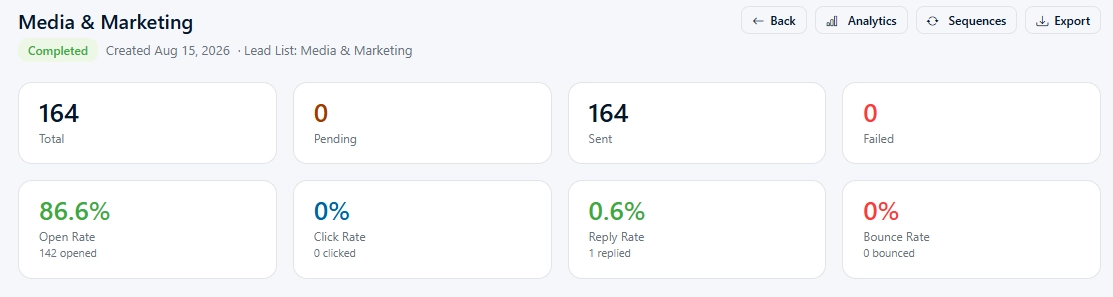
tracks all four on every send so the data is already there. The
following guide will show you how to read the data.
What Gets Tracked on Every Send
Every campaign email sent
through PostPalMail is tracked for opens and clicks, and bounces are detected
as they happen. Each message also carries an unsubscribe link, backed by a
global suppression list so that anyone who opts out isn't emailed again. The
full list of tracking and compliance features sits on the features
page.
None of these numbers is a
decision by itself. Imagine them as four indicators, on one display each
showing a part of the campaign: the subject line, the message, the list and the
audience.
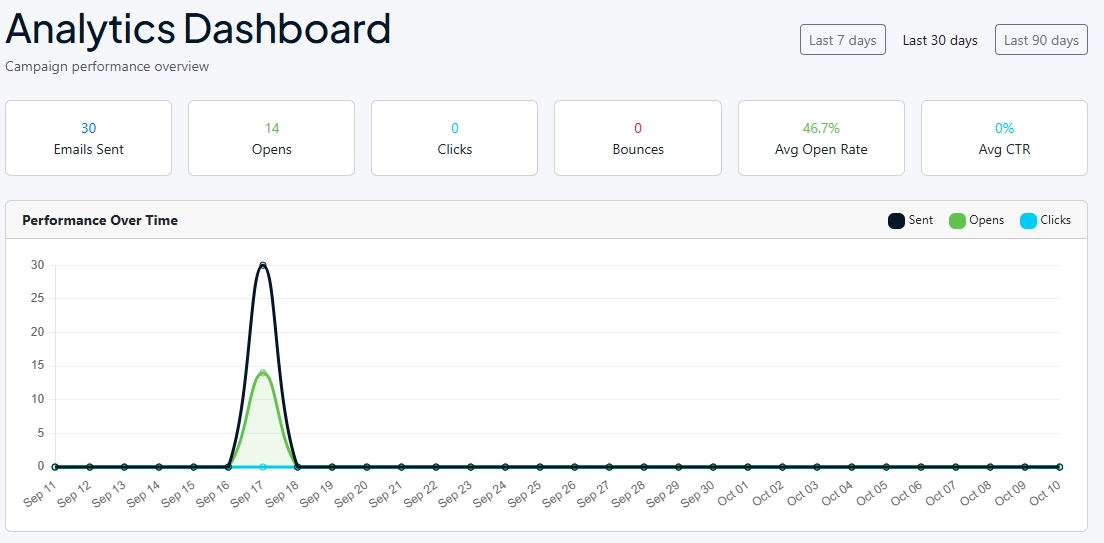
Opens: A Rough Guide, Not an Exact Count
An open is recorded when a small
invisible picture, inside the email appears and this method has two well-known
problems. Some email apps show pictures in the background before anyone has
seen the message, which can record an open that no person actually did. Other
apps stop pictures from showing by default so a person can read the email and
never get recorded at all.
Treat the rate as a trend. Not
just a number. Look at the rate. Compare it with the rate, from your own
previous campaigns that were sent to a similar group at a similar time. Do not
try to compare the rate with a number from someone else blog. When opens drop a
lot between two campaigns check the subject line first (our guide, to cold email subject lines talks about what to
test) and check if the sending account was properly warmed up.
Clicks: Stronger Evidence, With One Catch
A click takes a decision, so it
carries more weight than an open. Someone read far enough to get curious and
then did something about it. The catch is that some company security tools
visit every link in incoming mail to check it for threats, and those automated
visits can look like clicks. A burst of clicks within seconds of sending, from
several people at one company, usually means a scanner did the clicking.
Replies are the cleanest signal
you have, because a scanner can't write back. When clicks look strong and
nobody answers, the weak spot is probably the ending of the email or whatever
sits behind the link, and the piece on cold email CTAs is a good place to start.
Bounces: The Number to Check First
A bounce means the message never
made it to the inbox. A hard bounce happens when the email address is invalid
or the recipient’s server permanently rejects the message. A soft bounce is
different, it’s temporary like when the mailbox's full or the server is down,
for a short time.
Bounces matter more than the
other numbers because they cost you something. Each one tells mail providers
that you're sending to addresses you haven't checked, and that counts against
your sender reputation. PostPalMail finds bounces to help keep your sender
score in shape but the better solution comes earlier in the list. The lead search
shows an email status for each contact either Verified or Pending so choosing
contacts is a smart choice for the first send.
A brand-new sending account has its risks because a sudden increase, in mail can look strange no matter how good the list is. Our walkthrough of automatic email warmup explains how to ramp up safely.
Unsubscribes: Feedback You Can Use
Nobody likes to see an unsubscribe link. A few people leaving
is normal for any cold email campaign. It's better, than the option. Someone
who unsubscribes is politely asking you to stop sending them messages. Someone
who marks you as spam is telling their email provider to block you. That is the
one that causes real problems.
Watch the direction of travel of looking at one single
figure. When unsubscribes go up from one campaign to the next the usual reason
is that the message does not match the people who are getting it. That is a
targeting problem than a writing problem and making your filters stricter on
industry and country often helps more, than changing the email.
The Four Numbers at a Glance
Here is the short version, for
the days when you only have a minute.
|
Metric |
What it tells you |
If it looks off |
|
Opens |
Whether the subject line
and sender earned attention |
Review the subject line,
the send time and the account's warmup |
|
Clicks |
Whether the message made
someone curious |
Reduce the email to one
clear link and sharpen the ask |
|
Bounces |
Whether the list and
sending setup are sound |
Clean the list, prefer
Verified contacts, slow the volume |
|
Unsubscribes |
Whether the audience fits
the message |
Narrow the targeting and
review who is on the list |
Reading the Numbers Together
The real understanding comes
from putting them. Low opens usually start with bounces and point at the
subject line the timing or the way the email was handled when it arrived.
Healthy opens show clicks and almost no replies which mean the body or the closing
request isn't working. High bounces overrule everything else, because they put
your ability to send at risk, so fix the list before judging any other figure.
Rising unsubscribes next, to decent numbers usually mean you’re reaching the
wrong people, not that you’re saying the wrong thing.
Change one thing at a time. If you edit the list the subject line and the send time together then a better result doesn’t tell you which change actually helped.
A Made-Up Example, to Show the Reasoning
Imagine a campaign that goes to
200 contacts. Twenty‑two emails bounce, opens look middling. A handful of
people reply. The tempting move is to rewrite the line. The bounce figure
points elsewhere: than one email, in ten never arrived so the first job is
finding out why. Maybe the list was old. Maybe it was never narrowed by email
status.
After cleaning the list and
favoring Verified contacts, the same email goes to a fresh batch. Now the opens
and replies mean something, because the list has stopped distorting them. The
email was never the main problem.
A Simple Routine After Each Send
A short repeatable habit beats a
deep dive.
• Within the day I keep a habit of
checking bounces. If they are high I. Look at the list before sending more.
• After two or three days I compare
opens. Clicks with my last comparable campaign.
• At the end of the week, I note the
replies and unsubscribes then pick one change, for the next send.
Writing that one change down takes
thirty seconds. Without it, three campaigns later nobody remembers what was
different.
Conclusion
Metrics only help when you read
Metrics to see what Metrics can and cannot say. Opens suggest, clicks hint,
replies. Bounces warn. Put together, they show you which part of the campaign
needs attention next, which is far more useful than a single number going up or
down.
Ready to see your own numbers? Create
your PostPalMail account, send a small first campaign to Verified
contacts, and use the routine above to read the results. The pricing
page shows which plan fits the volume you have in mind.
Disclaimer
This article is meant to share info and shows how email
tracking usually works at the time it was written. Click numbers are just
guesses and can be off because of email apps or security tools. Things like
features and how the dashboard looks might change over time. So, check the
PostPalMail features page, for the info.