

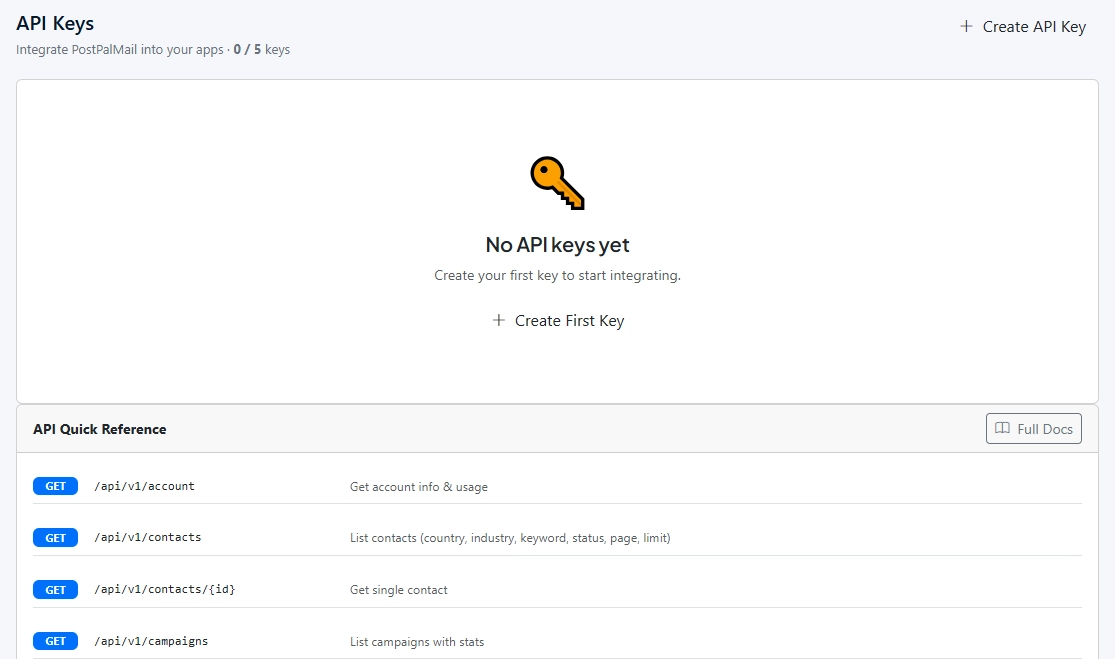
You need an API key, which you
can create on the API settings page in your PostPalMail account. Each request
must include the key in the Bearer token format in the Authorization header. In
case you have an invalid key, then you will get a status code of 401. The
fastest way to check whether your key is valid or not is to request for your
account details.
Checking addresses first costs
far less than repairing a damaged sender later. PostPalMail's
API includes email verification, either for a single address in real
time or for a batch of up to 10,000. This guide covers how both work, what each
check in the result means, and what to do with the answers. If you'd rather not
touch an API at all, there's a no-code route near the end.
Why Verify Before You Send
A bounce is more than a missed
email. Each one tells mail providers that you send to addresses you haven't
checked, and a climbing bounce rate is one of the quickest ways to look
careless in their eyes. We covered what bounces mean in our guide to cold email metrics, and the wider picture of
sender reputation in the email deliverability guide.
Lists also decay even when nobody does anything. People
leave companies domains expire and inboxes close. A list that was clean spring
can look noticeably worse by autumn. That is why checking lists before a
campaign matters more, than checking lists once and storing the result.
What You Need Before You Start
You will require an API key,
generated from the API settings page of your account. Every request must be
provided with the API key inside the Authorization header as a Bearer, but if
it’s not there, the system will respond with a 401 error. The most
straightforward approach to checking the key’s validity is requesting your
account details.
|
curl
https://postpalmail.com/api/v1/account \ -H "Authorization: Bearer
YOUR_API_KEY" |
One limit to plan around: each key can only make 1,000 requests per day. Batching is the choice when you need more, than a few addresses. A single batch request can handle thousands of addresses.
Checking a Single Address
The single check is a GET
request that contains the address in the query string. The check response comes
back immediately. This test will work perfectly if you are dealing with a lead
once and for all or using a registration form and need to identify a typo on
the spot.
|
curl
"https://postpalmail.com/api/v1/verify?email=someone@example.com" \ -H "Authorization: Bearer
YOUR_API_KEY" |
The response has three parts. The first part is the status,
which the documentation example shows as Valid. The second part is the risk
score. The third part is a list of checks. That example links a risk score of
12 with a status. This implies that lower numbers mean risk. However, it is
important to check the reference before making any rules based on this.
What Each Check Means
The individual checks are the
useful part, because they tell you why an address was flagged instead of only
saying that it was.
|
Check |
What it looks at |
Why it matters |
|
Syntax |
Whether the address is
written in a valid format |
A missing @ or a stray
space can never be delivered |
|
Disposable |
Whether the domain belongs
to a throwaway email service |
Those inboxes disappear, so
the mail is wasted |
|
Role-based |
Whether it's a shared
address such as info@ or sales@ |
No single person owns it,
so the message rarely feels meant for anyone |
|
MX record |
Whether the domain is set
up to receive email |
Without one, nothing can
arrive |
|
Catch-all |
Whether the domain accepts
mail for any address |
The server says yes to
everything, so a pass can't prove the mailbox exists |
|
SMTP |
Whether the mail server
responds as if the mailbox exists |
The closest thing to asking
the server directly |
In the documentation's example
of a clean address, syntax, MX and SMTP come back true while disposable,
role-based and catch-all come back false. Read the first group as things that
should pass and the second group as things that shouldn't apply.
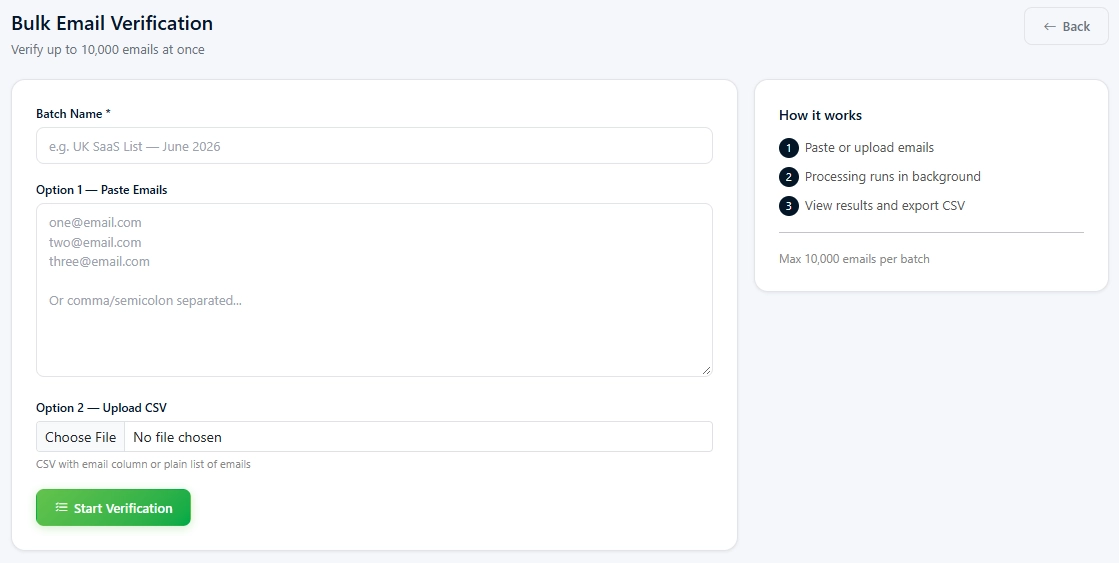
Verifying a Whole List in One Go
For a list use the batch
endpoint. You provide a name for the job and a list of emails, up to 10,000 in
a request and the task runs in the background. The response gives you a batch
ID and a status of queued of the results directly.
|
curl
-X POST https://postpalmail.com/api/v1/verify/batch \ -H "Authorization: Bearer
YOUR_API_KEY" \ -H "Content-Type:
application/json" \ -d '{"name": "Import
Cleanup", "emails": ["a@x.com",
"b@y.com"]}' |
A second request, to the batch status endpoint shows how things are going. Gives the results when they are done. Take a time with a big list instead of checking every single second because those status requests use up your daily limit as well.
Deciding What to Do with the Results
A verification outcome is a
suggestion, and the actions you take depend on your level of tolerance for
risk. A couple of principles have proven themselves in actual use.
• Keep the addresses that come back
Valid, and send to them first.
• Drop invalid and disposable
addresses. There's no argument for mailing a throwaway inbox that will be gone
next week.
• Treat role-based and catch-all
addresses as judgment calls. They're riskier, not certainly bad, so test a
small batch and watch the bounces before sending to the rest.
• Don't guess corrections for typos.
Turning gmial.com into gmail.com might reach a stranger instead of your lead.
If a send still produces bounces remember that a mailbox can
change after you checked it. Verification lowers the odds. Watching the numbers
after the send handles the rest.
A Made-Up Example, to Show the Reasoning
Take 2,000 addresses from a CRM.
Put them through a batch check. The numbers are made up. The pattern looks
real. Out of those 2,000 addresses 1,640 are valid. Then 190 are role-based or
catch-all. Finally, 170 are invalid or, from email services.
The 170 go in the bin without
discussion. The 1,640 are the strongest group to send to, though even then it's
wiser to start with a few hundred and look at the bounces before releasing the
rest. The 190 in the middle get their own small test, maybe thirty addresses,
so that a bad guess about them costs you thirty bounces rather than a hundred
and ninety.
That small test is the part that
people skip. This test feels slow. This test turns an unknown group into a
known group. The next list that you verify can be handled with evidence instead
of a hunch.
Sending the Clean List into a Sequence
When the list becomes clean the
API can enroll the addresses into an existing sequence. Then the user sends the
emails. Receives a number that shows how many addresses were added and how many
were duplicates. This number is very helpful when the list has repeated
addresses.
|
curl
-X POST https://postpalmail.com/api/v1/sequences/7/enroll \ -H "Authorization: Bearer
YOUR_API_KEY" \ -H "Content-Type:
application/json" \ -d '{"emails":
["lead1@company.com", "lead2@company.com"]}' |
For care the blacklist endpoint
checks whether an address is already suppressed before you add it. Inside the
sequence a question. Our article, about following up without sounding pushy explains
timing and wording while the sequences page displays what the blacklist
endpoint feature offers.
If You'd Rather Skip the API
Not everyone likes to write
requests. The lead
search shows an email status for every contact either Verified or
Pending so for lists created inside PostPalMail you can choose contacts without
any code. The API route is, for lists that come from places like a CRM export
or a signup form.
Conclusion
Verification takes a few
minutes. Spares you from a bounce problem that you would otherwise discover too
late. I recommend checking the list keeping the addresses sending a small batch
first and letting the results decide how fast you scale.
Are you interested in doing this
with your own list? Sign up for an account with PostPalMail and go
through the developer documentation, you’ll find what you need on their endpoint
reference page, along with their pricing page.
Disclaimer
This text is meant to provide information and explains the
PostPalMail API as it was described when this was written. The endpoints,
limits and response fields could be different now so always check the developer
documentation, for the information. Email verification helps lower the chance
of emails bouncing but does not ensure that the email is delivered.