

Sending three hundred emails
every day from one inbox is a fast way to get that inbox noticed for the wrong
reasons. Sending sixty emails each day from five inboxes is a completely
different situation and it seems much more like how regular inboxes work.
That's the idea behind SMTP
rotation. This guide explains what it does in PostPalMail, how to work out how
many sending accounts you actually need, and the mistakes that cancel out its
benefits. Some numbers below are invented for illustration, and I've said so
each time it happens.
What SMTP Rotation Actually Is
SMTP is the protocol mail
servers use to send messages. In PostPalMail you connect your own SMTP
accounts, so campaigns go out through mailboxes you own. Rotation means a
campaign's emails are spread across several of those connected accounts instead
of leaving through just one.
The benefit is easy to describe.
Volume is shared out, so each account carries less, and the reputation of each
sender is easier to protect. The features page lists SMTP rotation alongside
the rest of the sending tools.
Why One Inbox Becomes a Bottleneck
Mail providers look at each
sending account on its record counting how much it sends and how people reply.
An account that goes from a message a day to hundreds will catch attention no
matter how good the messages are. Mail providers will notice this change
quickly.
There is also a problem with
resilience. If one account does all the work and gets blocked your outreach
ends on that day. When multiple accounts share the work problems, with one
account are annoying. Not a complete stop.
People often say the writing is to blame when an accounts
results drop. The real reason is that the writing was asked to do much too
quickly. Sharing the work takes away that problem, which makes every test you
run easier to believe.
How to Work Out: How Many Accounts You Need
The arithmetic is short. Decide
how many emails you want to send each day, decide what volume one account can
comfortably carry, then divide and round up.
The second number needs care.
The right figure depends on the mailbox provider and on how old the account is,
and a brand new account should start low and climb gradually. Please don't take
a number from a blog post, this one included, as a rule for your own accounts.
Treat the figures in the table as made-up examples that show the math.
|
Daily target |
Comfortable per account (example) |
Accounts needed |
|
40 emails |
20 emails |
2 |
|
100 emails |
25 emails |
4 |
|
150 emails |
30 emails |
5 |
|
300 emails |
30 emails |
10 |
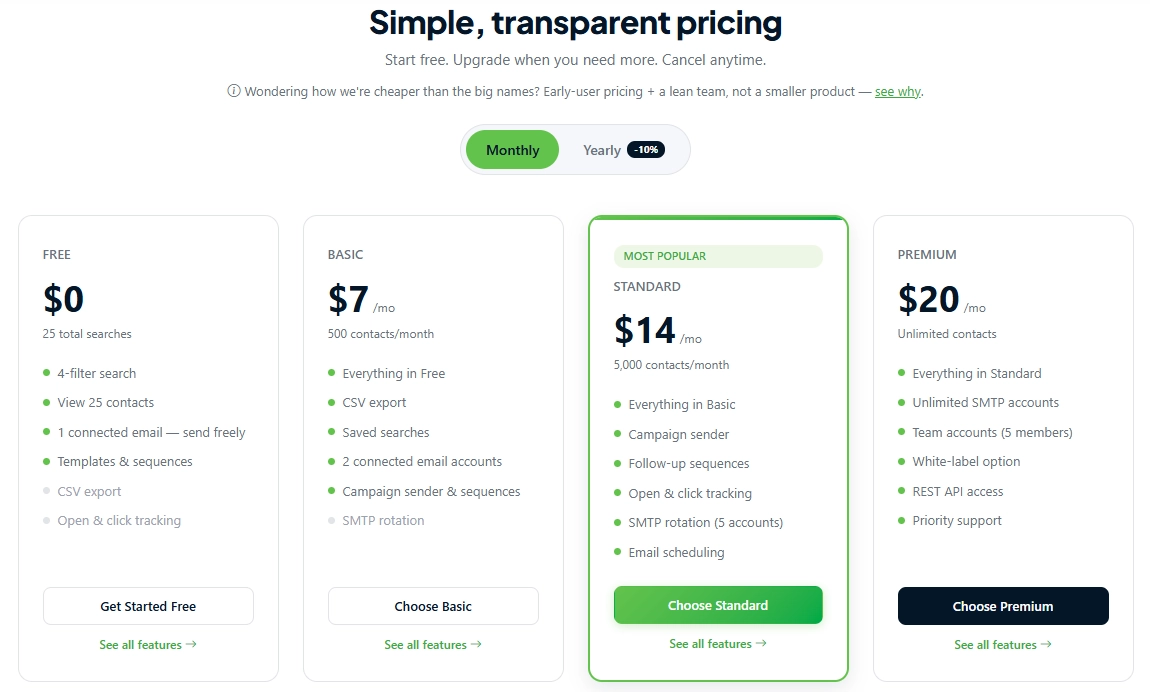
Now compare the result with your
plan. The features page lists 1 connected account on Free, 2 on Basic, 5 on
Standard and unlimited on Premium, and it lists SMTP rotation across 5 accounts
on Standard and unlimited on Premium. In the invented examples above, 150
emails a day at 30 per account fits Standard exactly, while 300 a day would
need Premium. The pricing page has the current plans.
A Realistic Growth Path
Nobody should jump from one
account to ten in a week. A steadier route looks like this.
· Start with one account,
warmed up before it carries real volume, sending a small number each day.
· When results remain healthy connect an account and allow the second account to warm up while the first account continues working.
· Add accounts one at a time
each account warmed up before the additional account joins the rotation.
· Increase the total only
after a few clean sends and never during the same week you add an account.
That route is slower than adding
five accounts at once. It also leaves you knowing which change caused any
problem, which is worth more than the time saved.
Our guide to automatic email warmup covers what to do with
each new account before it takes on real volume.
A Worked Scenario, With Invented Numbers
Picture a small agency that
wants to send 120 emails a day for a client. Using the comfortable figure of 30
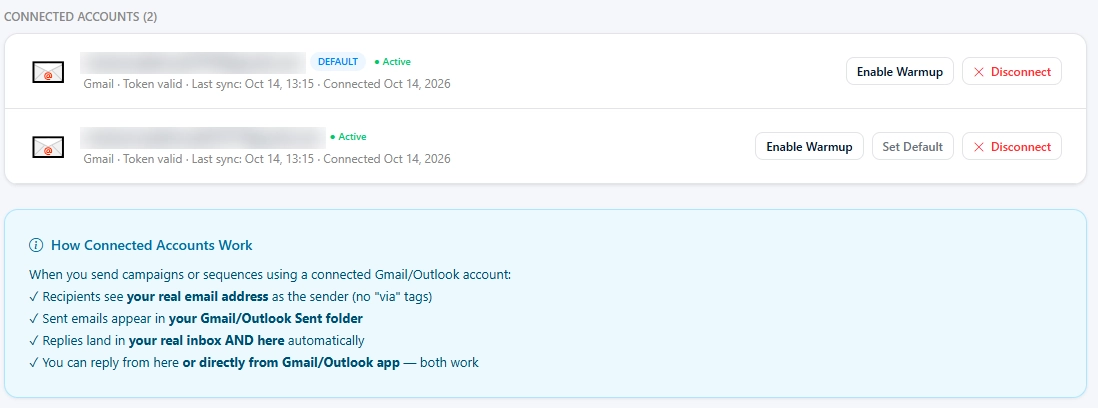
per account from the table, that points to four accounts. The Basic plan lists
two connected accounts, so there is a decision to make.
One option is to move up to
Standard, which lists five options. The other option is to start at 60 emails a
day across two accounts. I would run that for a week then upgrade the results
and the size of the list justify the extra volume and that is the other option.
Neither option is wrong. The second option costs less. Teaches you how your
accounts behave before you commit while the first option reaches the target
sooner.
What the agency shouldn't do is
squeeze 120 emails through two accounts to avoid the upgrade. That recreates
the exact bottleneck rotation exists to remove, except now it has been built on
purpose.
Setting Up Accounts So They Help Rather Than Hurt
Rotation only spreads risk when
every account is set up correctly.
• Use mailboxes that truly belong to
your business with a real sender name, behind them.
• Consider a separate sending domain
for cold outreach, so trouble there doesn't touch the domain your invoices and
client emails come from.
• Make sure SPF, DKIM and DMARC are
set up properly on every domain you send from. Our deliverability guide has the details.
• Keep the sending volume
consistent for each account. Avoid spikes in email volume on some days and very
low volume, on others.
None of this is glamorous. It
is, however, the difference between a setup that lasts and one that gets
rebuilt every few months.
When Another Account Isn't the Answer
More accounts are the obvious
fix when volume is the problem, but volume isn't always the problem. Before
connecting another one, ask four questions.
• Does the list become big enough to
require it? Sending thirty emails a day to the list of 200 people does not
justify having five accounts.
• Are the existing accounts healthy, with bounces and
unsubscribes?
• Is there time to warm the new one
up properly?
• Are replies reasonable for the
volume already going out? Weak replies from healthy accounts point at the
message, not the sending setup.
If the answer to all four is
yes, another account is a sound move. Any no is the thing to fix first.
What Rotation Can't Do
Spreading volume doesn't change
who you email or what you say. A list full of invalid addresses will bounce
from five accounts exactly as it would from one, and now five reputations are
paying for it. Cleaning the list first, for example with the verification API, does more for deliverability
than any number of extra accounts.
The same rule applies to
content. Using accounts to send messages that people do not want is a fast way
to get complaints and complaints follow the sender no matter which account it
came from. After every send check for bounces and unsubscribes (our metrics guide explains how to read them). Look
closely at every account that behaves differently from the others before you
add volume. Keep a watch, on the content the accounts, the messages and the
complaints.
Conclusion
SMTP rotation keeps each sending
accounts workload. SMTP rotation does not let you send more than is sensible.
Find out how many sending accounts you need for your target. Add those sending
accounts slowly. Warm each sending account up. Watch the numbers. If you do
that in that order SMTP rotation gives you room to grow without betting the
operation on a single inbox.
Ready to plan your own setup? Create
your PostPalMail account, compare the plans on the pricing
page, and connect your first sending account.
Disclaimer
This article is intended for informational purposes and
reflects email sending practices as commonly understood at the time of writing.
The volume figures are invented examples not recommended limits and safe
sending volumes vary by mailbox provider and account history, which's part of
email sending practices. Plan limits and features may change, so check the
PostPalMail features and pricing pages for details.