

Picture a brand-new inbox,
created this morning, sending three hundred cold emails by lunch. Mail
providers have never heard of it. No history, no replies, no track record, just
a sudden wall of messages going to strangers.
That inbox won't survive the
week. Plenty of people learn this the expensive way, after open rates fall off
a cliff and nobody can explain why. Warmup exists so you don't have to. This
guide covers what PostPalMail's automatic warmup does, when it's worth
switching on, and what it can't do for you.
Why a Brand-New Sender Looks Suspicious
Gmail, Outlook and other email
services look at every sender before deciding where a message will go. They
look at how the account has been around how the sending volume changes, over
time and how people react when they get the emails. A new account doesn’t have
any of that history. Because of that it gets handled with caution.
Spammers love fresh accounts
too, which is exactly why a sudden burst from one looks bad. You can be
completely legitimate and still resemble the thing providers are built to stop.
Time and a believable pattern
are the only fix.
What Automatic Warmup Does in PostPalMail
PostPalMail's
automatic warmup slowly increases your sender reputation over time
before you start sending campaigns. This means a new sending account doesn't
suddenly send a volume of emails right away. It starts with a ramp. Then it
follows a believable pattern. After that it moves into sending.
It’s designed to help your
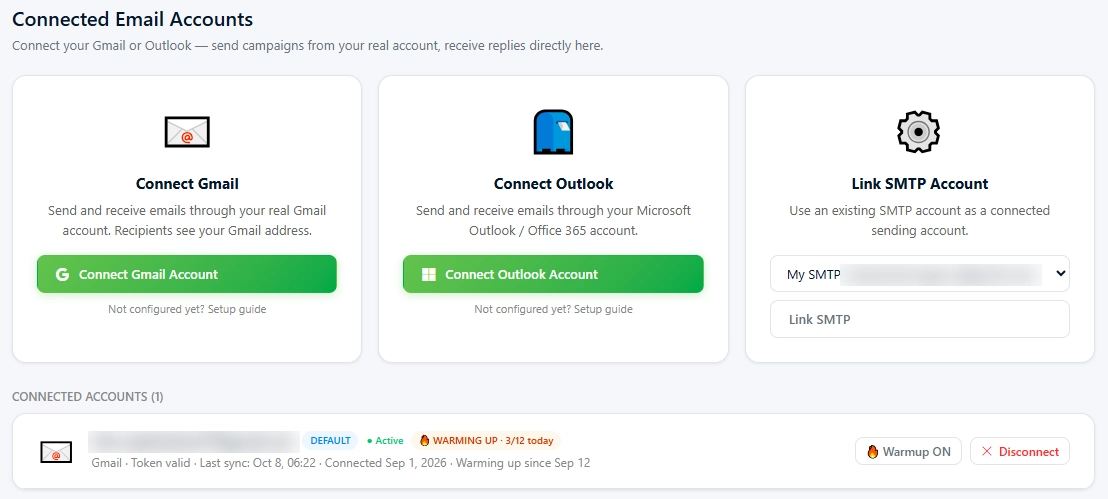
emails reach the inbox of the spam folder. You can see it working in Settings
under Connected Accounts. Each connected account shows whether warmup is on,
along with a daily count. It can't promise placement, and neither can any other
tool. If someone guarantees inbox delivery, they're selling you something.
When You Actually Need It
Warmup matters most in a few
specific situations.
•
A brand-new email account or
domain. The obvious one.
•
An inbox that sat unused for
months and is about to start sending again.
•
Any account you plan to push well
past its usual daily volume.
•
A fresh SMTP account you just
connected for a big campaign push.
If you're sending a handful of
one-to-one emails from an inbox you've used for years, warmup matters far less.
Your history already does the talking.
How Long to Plan For
Give an account, at least a
couple of weeks before you start running real campaigns. A period of two to
four weeks is a planning window but the ideal length depends on the account and
how quickly you want to grow. Pushing hard too soon is the one thing that
almost always leads to problems.
Yes, waiting is annoying. Launch day always feels urgent. It is the time when everything feels tight. A burned inbox costs more, than a fortnight ever will. You end up waiting while you rebuild.
A Worked Example
Say a freelancer sets up a fresh
inbox on a Monday and wants to pitch web design clients. Here's one sensible
way to play it. This is an illustration of the thinking, not a fixed
PostPalMail schedule.
Weeks one and two: connect the
account, switch warmup on, and send nothing real. Use the time to build a list
with tight filters and to write the first template. The waiting is useful,
because list and copy are where most campaigns are won or lost anyway.
Week three: send a small first
campaign, maybe thirty contacts, all Verified. Check the bounces and the
replies before doing anything. Week four: if the numbers look clean double the
volume. If bounces spike, stop and look at the list before sending another
message.
Boring? Sure. But it's the plan
that still works in month six, and the aggressive one usually doesn't.
Pair Warmup with SMTP Rotation
Warmup protects each sender on
its own. Rotation spreads the load between them. Together they stop any single
inbox from carrying more than it safely can.
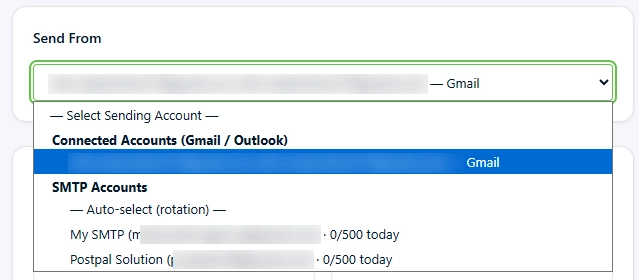
PostPalMail allows you to link
your SMTP accounts and switch sending between them. This spreads out the number
of emails you send. It helps keep the reputation of each sender safe. The
number of accounts you can link depends on your plan. The
features page shows 1 on Free, 2 on Basic 5 on Standard and
unlimited, on Premium.
One detail worth knowing: automatic warmup is switched on per connected Gmail or Outlook account, under Settings and then Connected Accounts, where each account shows its warmup status. Rotation works on your SMTP accounts. When you create a campaign, open the Send From menu and choose “Auto-select (rotation)” to spread sending across them.
What Warmup Can't Fix
Warmup builds reputation. It
does nothing to repair the habits that destroy it.
•
A list full of invalid addresses.
Bounces hurt a sender fast, however well it was warmed.
•
Missing authentication. SPF, DKIM
and DMARC still need to be set up on your domain.
•
Spammy subject lines and copy.
Filters judge the message itself too.
•
Sending the identical email to
everyone at once.
Fix those first and warm up
second. If you want the picture on the technical side our email deliverability guide covers
authentication and list hygiene. The piece, on cold email subject lines covers the content
side.
Warmup Mistakes Worth Avoiding
Most warmup problems come from
impatience rather than anything technical. These are the ones that show up
again and again.
•
Starting real campaigns on day
three because the account looks fine. It looks fine because it hasn't been
tested yet.
•
Warming one account, then sending
the whole list through it in a single afternoon.
•
Skipping warmup entirely after a
long break. A dormant inbox gets treated closer to a new one than people
expect.
•
Ignoring the first bounces. Early
bounces are the cheapest warning you'll ever get, so read them.
•
Hopping between sending domains
whenever results dip. Every switch resets the reputation you were building.
There's a pattern in that list.
Each mistake trades long-term reputation for short-term speed, and reputation
is the thing that took weeks to build.
How to Tell Whether It's Working
The sender score cannot be seen
directly. Instead, you judge the warmup by watching what happens when real mail
goes out. Three signals give the sender score and the warmup the information
you need.
First, bounces. A clean list
sent from a healthy account should bounce rarely. If the rate jumps on your
first small campaign, suspect the list before you suspect the account. Second,
opens. They vary by audience, but a sudden collapse between two similar
campaigns usually points at placement trouble rather than a weak subject line.
Third, replies. Even a couple of genuine replies from a first batch is a good
sign, because replies are the strongest positive signal a sender can earn.
PostPalMail shows how times an email was opened how many
times links were clicked and how many emails bounced after each send. This way
you can compare one campaign with the next of making guesses. Make one change
at a time. If you change the list the copy and the volume all together you will
never know which one caused the numbers to change.
A Short Checklist Before You Launch
Run through this, before the real
send.
•
Connect the sending account.
Switch warmup on.
•
Make sure SPF, DKIM and DMARC are
set up correctly for your domain.
•
Build your contact list using
filters and choose contacts instead of Pending ones.
•
Start campaigns small well under
your eventual daily volume.
•
Watch bounces and complaints
across the first few sends. Scale up only if they stay low.
•
Set a delay between emails, in the
sending speed settings of the campaign so the emails do not all go out at the
same time.
Once real sending starts pay attention to the numbers. Open
and click tracking, along, with bounce detection are built into PostPalMail so
any problems appear quickly. If the bounce rate begins to rise during the week
that’s a sign to slow down not to keep pushing forward.
Conclusion
Warmup is the exciting part of
cold email but it’s probably one of the most important. Nobody likes to wait.
Still sending from a reputation you built with care is better, than sending
from one you just hope is okay.
Turn warmup on early. Use the
waiting time to work on your list and improve your copy. Start sending small.
When the volume increases the account will have earned that trust.
Ready to set up your first
sending account? Create your PostPalMail account and check the pricing
page to see which plan covers warmup and SMTP rotation for the
volume you have in mind.
Disclaimer
This article is intended for informational purposes and
reflects email sending practices as commonly understood at the time of writing.
Mail provider rules can. No tool or practice can guarantee inbox placement.
Plan limits and feature availability may change, so check the PostPalMail
pricing and features pages for details. I hope this information helps you
navigate email sending practices smoothly.