

Finding the person is usually the easy part. Finding a working email address for that person is where most outreach plans quietly stop. A name and a company tell you who to contact, not how to actually reach them and that gap is what this guide is here to fix, covering the methods people actually use why guessing is riskier than it looks and how to make sure an address works before you create a whole campaign, around it. None of this requires tools or special access just a little bit of pattern recognition and one habit most people ignore: checking before you send.
Why Business Emails Are Harder to Find Than You'd Think
From my experience Company websites rarely list employee emails. LinkedIn shows a name and a title. I almost never see an email. Most people do not publish their address anywhere obvious. Typically, what I am left with is a name, a last name and a company domain. From there I either guess, dig deeper. Use a tool that has already done the digging, for me. None of these approaches are wrong, they just fit different situations, one contact you really want to reach calls for a different approach than fifty contacts you're building a campaign around.
Common Methods to Find a Business Email Address
- Check the company website: The About Team or Contact page sometimes lists direct emails, especially at smaller companies. It is the method when it works and it does not always work.
- Format guessing: Most companies use one pattern for every employee email so once an address at a company is known, the email for any other employee, at that company can be guessed.
- LinkedIn plus a guess: Find the name and title on LinkedIn, then apply the company's likely format to build the address yourself.
- A lead search tool: Skips the guessing entirely by pulling from a database of already collected, and ideally already verified, business contacts.
Common Email Format Patterns
If you know how a company formats one employee's email, applying the same pattern to someone else at that company usually works. Here are the patterns you'll run into most often, using a fictional employee, Jordan Smith at examplecorp.com, as the example:

|
Pattern |
Example |
How Common |
|
first.last |
jordan.smith@examplecorp.com |
Very common |
|
firstlast |
jordansmith@examplecorp.com |
Common |
|
first |
jordan@examplecorp.com |
Common at smaller companies |
|
f.last |
j.smith@examplecorp.com |
Moderately common |
|
firstinitiallast |
jsmith@examplecorp.com |
Very common |
|
last.first |
smith.jordan@examplecorp.com |
Less common |
A Quick Note on Confidence Levels
Not every guess deserves the same trust. A pattern you've already confirmed for one person at a company, someone whose email you know for certain, is a strong basis for guessing a colleague's address at the same company. A pattern you're assuming purely because it's the most common one across companies in general is a weaker bet, and worth double checking before you rely on it for anything beyond a single, low stakes email.
The Problem with Guessing
Format guessing works often enough that people rely on it, but it has a real weakness: catch all domains. Some company mail servers are configured to accept any email sent to their domain, even ones that don't correspond to a real employee, rather than bouncing it back. That means a wrong guess can look successful (no bounce message) while actually never reaching anyone. You end up thinking you've made contact when you haven't, and worse, your open and reply data for that contact becomes meaningless since no real person ever saw it.
This is exactly why guessing alone isn't a complete strategy, it needs to be paired with a way to check whether an address is genuinely valid, not just accepted.
Verifying an Email Before You Send
This is what Email Verification is for. Run an address through it, and it comes back marked Valid, Invalid, or Risky, giving you a genuine read on whether that address is worth sending to, rather than finding out from a bounce after the fact.
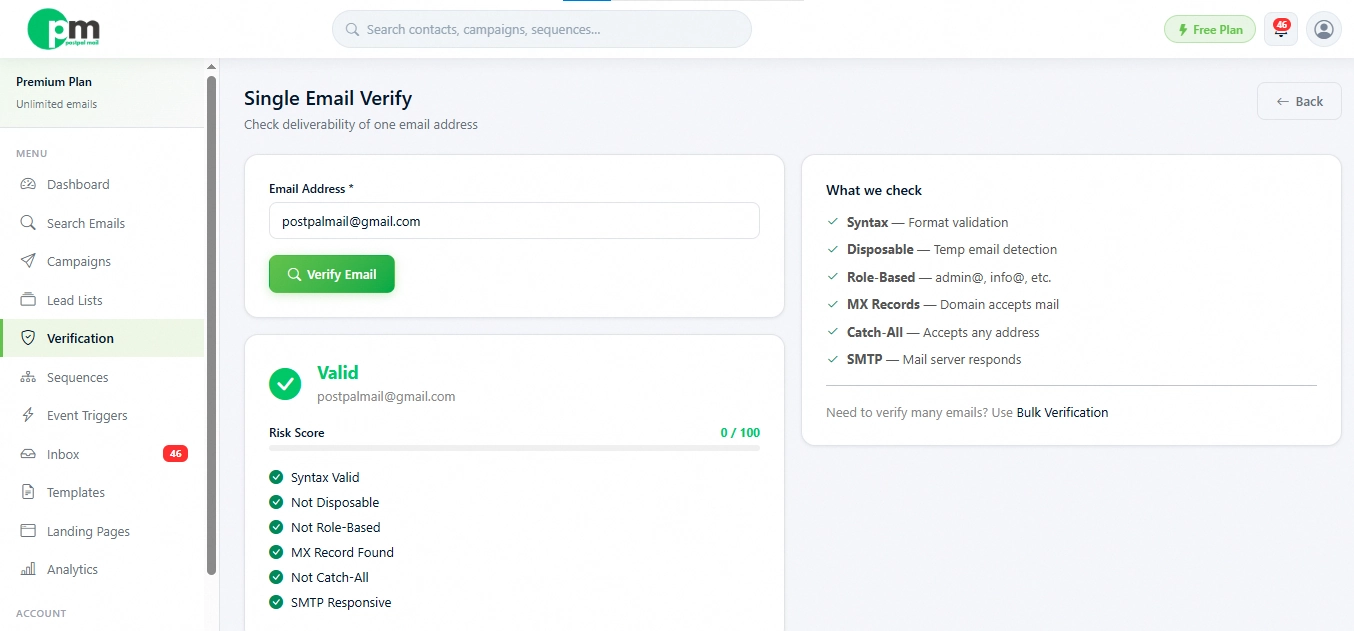
You can check a single address on the spot, or run a whole batch at once if you've built a list using format guessing and want to confirm it before launching a campaign. Anything marked Risky is worth a second look rather than an automatic send, since it usually means the result is inconclusive rather than clearly good or bad.
Finding and Verifying Emails Inside PostPalMail
Rather than guessing a format and verifying it separately, the Search page lets you skip a step entirely. Filter by Keyword, Country, and Industry, then set Email Status to verified only, and every result you see has already passed verification, no guessing, no separate check required.
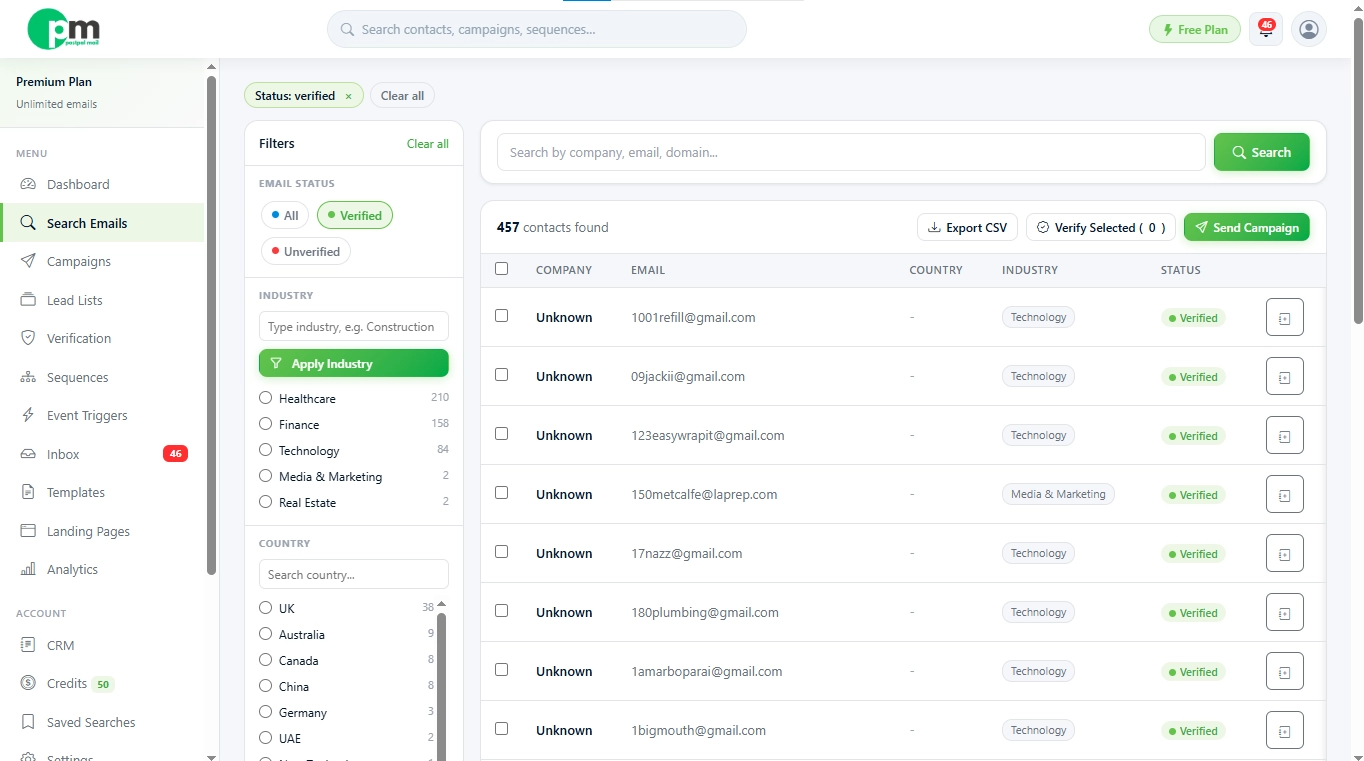
From there, save the results into a Lead List and you've got a ready to use, pre-verified group of contacts without ever having to build an email address from a guess. For a role you specifically need, say a head of procurement at one particular company, the format and verify approach above still makes sense. For building an outreach list of dozens or hundreds of similar contacts, searching directly for verified results is almost always the faster route.
A Practical Example
Say you have found a marketing director named Alex Rivera at a company called Brightpath Retail. No email appears anywhere. Here is how you would work through it with Alex Rivera, at Brightpath Retail:
- Check Brightpath Retail's website for a team or contact page first
- If nothing turns up, look at any other Brightpath employee whose email you can find, say, a support address like hello@brightpathretail.com, which tells you little about the personal format
- Try the most common pattern, first.last, so alex.rivera@brightpathretail.com
- Run that guess through Email Verification before sending anything to it
- If it comes back Risky or Invalid, try the next most common pattern and verify again
- Alternatively, search for Brightpath Retail directly in PostPalMail's Search page with Email Status set to verified, and skip the guessing entirely if a match exists
Either path gets you to a usable address. Manually going through each contact takes a little time for every single person. That extra time starts to add up when you are trying to build a list with fifty or even a hundred names, not one and that extra time can become a real burden.
Find Verified Business Emails with PostPalMail
Guessing and checking works, but it takes time you probably don't have for every single contact. If you'd rather search directly for already verified business emails, create a free PostPalMail account and try it on your next list.
Disclaimer: This article is, for general informational purposes and does not count as legal advice. Always confirm that your outreach practices match the email marketing regulations that're in force in the regions where your contacts are located.