

If you sell to other businesses, finding the right people to talk to is the actual first step, before any pitch, before any email. Most people learn this the way after spending a weekend building a spreadsheet of names with no way to reach half of them. This guide covers how to do it properly: the manual methods that still work, where they start to break down once you need more, than a handful of contacts and how a purpose‑built tool changes the equation from there.
What Counts as a B2B Lead
A B2B lead is simply a person at another business who has a real reason to care about what you're offering, along with a way to reach them. That second part matters more than people assume. A list of company names without contact information isn't a lead list it's a list of guesses. A useful B2B lead needs three things: the person, the right company and a working way to reach them. The right person means someone, with the title or role. The right company means a business that fits your target market. A working way to reach them always means an email address. For example, say you sell inventory software to retailers. A list of a hundred retail companies is a start, but until you know who actually makes purchasing decisions there, and how to email them, you don't have leads yet, you have homework.
Manual Methods for Finding B2B Leads
Before any tool enters the picture, most people start here, and these methods genuinely work for small volumes.

- LinkedIn search and Sales Navigator: From my experience LinkedIn search and Sales Navigator allow you to filter by title, industry, company size and location. After filtering you can manually write down names and companies that match. This method is free. However, LinkedIn does not provide email addresses directly. Therefore, you often have to guess the email format or search separately for email format.
- Google search operators: Google search operators can be used by typing a query such as site: linkedin.com along with a job title and industry. This technique can surface profiles that a normal search might miss. Google search operators work well for specific searches. However, Google search operators are slow when searching broadly.
- Industry directories and associations: Industry directories and associations provide directories or membership lists. Many industries have resources. These tools are useful, for niche sectors where LinkedIn coverage's thinner.
- Trade shows and events: attendee lists and exhibitor directories are a solid source, particularly for regional or specialized markets, though they only refresh a few times a year.
- Referrals and existing network: asking current customers or contacts for introductions tends to produce the highest quality leads, just not at any real volume.
Where Manual Methods Start to Break Down
None of the above is wrong, they just don't scale. A few contacts a day by hand is manageable. Fifty a day, done manually, starts eating your entire week, and a few specific problems show up consistently:
- Email addresses are the hardest part. Most directories and LinkedIn profiles don't show one, so you end up guessing common formats or using separate lookup tools
- There's no way to verify an email actually works before you send to it, so manual lists tend to carry a higher bounce rate
- Nothing is centralized. Names end up scattered across spreadsheets, notes apps, and browser tabs, with no single place tracking who you've already contacted
- It doesn't filter efficiently. Searching by country, industry, and role all at once usually means combining several separate searches by hand
Using a Lead Search Tool Instead
This is the point where most growing teams switch from manual research to a dedicated tool. The underlying idea is straightforward: instead of hunting across LinkedIn, Google, and directories separately, a lead search tool holds a database of business contacts you can filter directly by the details that matter to you, industry, country, company type, and whether the email has already been verified.
The real time savings shows up in two places: filtering (getting to a relevant list in seconds instead of an hour of manual searching), and verification (knowing an email is likely to land before you send it, instead of finding out from a bounce).
Finding B2B Leads Inside PostPalMail
This is exactly what the Search page in PostPalMail is built for. Instead of piecing together LinkedIn profiles and guessed email formats, you filter directly by Keyword, Country, and Industry, and narrow further with an Email Status filter to only surface contacts that have already passed verification.
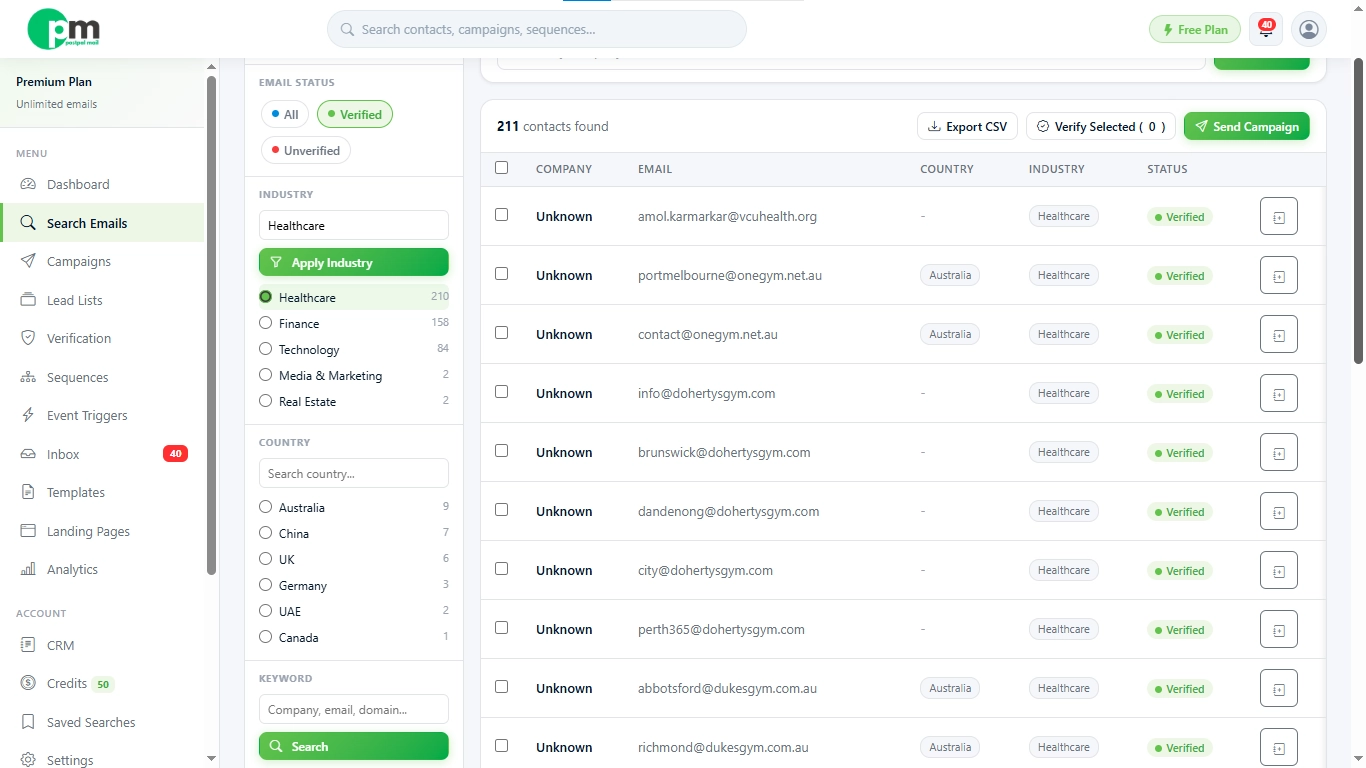
Once you have found a group that fits what you need add them to a Lead List. You can use a list that stays the same or a Smart list that keeps adding new people who match your criteria automatically. From there it's easy to send a message write your message connect your sending account and start a Campaign from the same platform.
A Practical Example Workflow
Say you run a small agency looking for marketing managers at mid-sized retail companies in Canada. Here's how that search plays out:
- Open the Search page and enter 'marketing' as your keyword
- Set Country to Canada, and Industry to Retail
- Switch Email Status to verified only, so you're not chasing addresses that will bounce
- Review the results and save them into a new Lead List called 'Canada Retail Marketing'
- Write a short, specific outreach template mentioning something relevant to retail marketing
- Launch a campaign from that list, sending safely in the background
What would have taken an afternoon of LinkedIn searching and manual note taking becomes a task measured in minutes.
A Few Mistakes to Avoid
A handful of mistakes keep appearing in B2B lead generation again and most of these mistakes are easy to avoid if you know where to look.
- Chasing volume over fit: A list of five hundred loosely related contacts usually performs worse, than a list of fifty contacts that truly match your ideal customer. Narrow filters beat filters almost every time.
- Skipping verification: Sending to unverified addresses doesn't just waste a send, repeated bounces can quietly damage your sender reputation and hurt every campaign after it.
- Treating every lead, the same: A marketing manager and a founder don’t react to the kind of message. So, grouping contacts, by role or industry before writing outreach usually leads to results.
- Reaching out once and giving up: Most replies come after a follow-up, not the email. So, skipping follow-ups means missing out on potential responses.
Start Finding B2B Leads with PostPalMail
Manual research has its place, but it doesn't scale past a certain point. If you're ready to filter, verify, and reach out to B2B leads from one place, create a free PostPalMail account and try your first search today.
Manual Research vs a Lead Search Tool
|
Manual Research |
Lead Search Tool |
|
Free, but slow at any real volume |
Paid plans, but dramatically faster once volume grows |
|
Email addresses often have to be guessed or looked up
separately |
Contacts include verified email addresses directly |
|
No built in way to check if an email is valid |
Built in email verification before you send |
|
Results scattered across tabs, notes, and spreadsheets |
Results organized directly into reusable lists |
|
Best for a handful of highly specific, high value leads |
Best for building repeatable, ongoing outreach at scale |
Disclaimer: This article is for general information and does not provide legal advice. Email marketing and outreach laws vary by region so email marketing and outreach laws differ across regions. Always check the rules, for the areas where your contacts live before you send out campaigns.